Golf Simulator Near Me For Sale: Your Complete Buyer's Guide
Discover how to find a golf simulator near you, compare launch monitors, enclosures, and software, and choose the right indoor golf system for your home, garage, or commercial space.
Explore Recommended Systems
Why a golf simulator? An indoor golf simulator lets you practice and play year-round, regardless of weather, daylight, or course availability. Whether you are searching for a golf simulator near you for sale or planning a full home build, understanding the key components and tiers will help you make a confident, informed purchase.
What Is a Golf Simulator and How Does It Work?
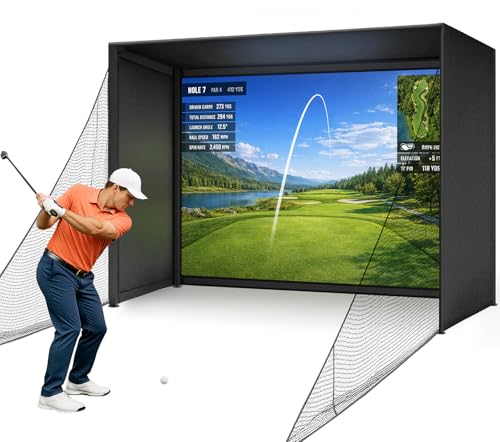
A golf simulator is an indoor system that combines a launch monitor, a hitting area, a projection screen or enclosure, and simulation software to recreate the experience of playing real golf courses. The launch monitor measures critical data such as ball speed, launch angle, spin rate, and club path. The software then translates that data into a virtual ball flight, displayed on a screen or projected onto an impact screen, so you can watch your shot travel down a virtual fairway.
Modern simulators range from compact, portable setups for garages and basements to premium, commercial-grade installations found in entertainment venues and training centers. The technology behind these systems overlaps significantly with dedicated launch monitor and simulator packages, which are worth exploring if you want a deeper technical comparison. If you are still deciding between a simulator and a simpler practice setup, browsing golf simulators and golf technology guides can help you understand the broader ecosystem of indoor training tools.
Many golfers first encounter simulators at commercial venues. If you are searching for a place to try one before buying, look for an indoor driving range near you that offers simulator bays. Testing different systems in person is one of the smartest ways to decide which tier and feature set fits your needs.
Key Components of a Golf Simulator System
Before you buy, it helps to understand the main building blocks. Most systems for sale include or require the following components:
Launch Monitor
The measurement device that captures ball and club data. Accuracy varies by tier, from entry-level radar units to premium photometric and radar systems.
Simulation Software
The software that turns data into virtual ball flight. Look for a strong course library, practice modes, and reliable physics.
Enclosure & Screen
The frame, impact screen, and netting that safely contain shots. Enclosure quality affects durability, noise, and image clarity.
Hitting Mat
A quality mat protects your joints and clubs while providing realistic turf feedback. Mat quality is often overlooked but matters greatly.
Projector & Display
The projector or display shows the virtual course. Brightness and resolution determine how immersive the experience feels.
Computer & Connectivity
Some systems require a capable PC or tablet to run the software. Check compatibility and whether a device is included.
How Much Space Do You Need?
Space is one of the most common concerns for buyers. As a general rule, most home golf simulators require a ceiling height of at least 9 to 10 feet, a width of 10 to 12 feet, and a depth of 15 to 20 feet from the hitting area to the screen. However, these figures vary by system. Compact radar-based setups can work in tighter spaces, while premium systems with larger enclosures need more room.
Always verify the manufacturer's specific requirements before purchasing. If you are building a dedicated practice area, you may also want to review guides on practice net cages with simulator impact screens and practice nets with hitting mats to plan a safe and effective layout. For those considering a hybrid approach, a training mat for swing detection can complement your simulator setup.
Golf Simulator Distance From Screen: Why It Matters
The distance between your hitting position and the impact screen affects both safety and accuracy. Too close, and you risk damaging the screen or having limited ball flight visibility. Too far, and the projected image may appear small or distorted. Most manufacturers provide recommended distances, typically ranging from 8 to 12 feet from the screen to the hitting area, with additional depth needed behind the golfer for backswing clearance.
For a detailed breakdown, see our guide on golf simulator distance from screen. This is especially important for garage or basement builds where every inch counts.
Golf Simulator Tiers: Entry-Level, Mid-Range, and Premium
To help you compare systems without focusing on prices, it is useful to think in terms of quality tiers. The table below summarizes what you can generally expect at each level. Use this framework to match a system to your goals, space, and experience level.
| Tier |
Typical Characteristics |
Best For |
| Entry-Level |
Basic radar or photometric launch monitors, simpler enclosures, fewer courses, and reduced data metrics. Setup is often more portable and requires less space. |
Beginners, casual practice, tighter spaces, and golfers testing whether a simulator fits their routine. |
| Mid-Range |
Improved accuracy, more data parameters, a larger course library, and sturdier enclosures. Often includes better software features such as practice modes and online play. |
Serious home users, year-round practice, and families who want a balance of performance and value. |
| Premium |
High-accuracy dual-radar or high-speed camera systems, extensive course libraries, commercial-grade enclosures, and advanced analytics. Installation may be more involved. |
Dedicated golfers, coaches, commercial venues, and users who demand the most realistic experience and data. |
For golfers who want to pair simulator practice with swing improvement, consider how the system integrates with golf swing apps and golf coaching apps. These tools can complement simulator data and help you track progress over time.
What to Look For When Buying a Golf Simulator
Use this checklist to evaluate systems objectively:
- Launch monitor accuracy: Look for verified ball and club data, especially spin rate and launch angle. Systems that measure spin directly tend to provide more reliable virtual ball flight.
- Software and course library: A strong library of recognizable courses and practice modes adds long-term value. Check whether software requires a subscription.
- Enclosure durability: Impact screens and netting should handle repeated high-speed shots. Commercial-grade materials last longer but may cost more upfront.
- Space fit: Confirm ceiling height, width, and depth requirements for your specific room or garage.
- Ease of setup: Some systems are portable and easy to assemble; others require professional installation.
- Data and analytics: More advanced systems provide detailed club and ball data, which is invaluable for practice and improvement.
- Compatibility: Check whether the system works with third-party software, tablets, or PCs, and whether online play is supported.
If you are also upgrading your practice area, related gear such as a training aid for swing path or training aids for swing plane can help you translate simulator feedback into real swing changes.
Pro Tip: Before committing to a full simulator, try a session at a commercial venue or an indoor driving range near you. Testing different tiers in person will clarify which features you truly need and help you avoid over- or under-buying.
Finding a Golf Simulator Near You for Sale
Shopping for a golf simulator near you has advantages: you can see systems in person, ask questions, and sometimes arrange installation. Start by searching for local golf retailers, indoor training centers, and specialty simulator dealers. Many commercial venues also sell or partner with manufacturers, so a visit can double as product research.
If you are still exploring indoor golf options in your area, our guide to indoor driving ranges near you is a useful starting point. For broader course and facility research, browse golf courses near you with driving ranges. When you are ready to compare systems online, the product section below features recommended options aligned with this topic.
Installation and Room Preparation Tips
A successful installation starts with careful room preparation. Key considerations include:
- Safety first: Ensure netting and enclosures fully contain shots. Reinforce walls or ceilings if needed.
- Lighting: Control ambient light to improve projector visibility and reduce glare on the screen.
- Flooring: A stable, level floor is essential for accurate launch monitor readings and safe stance.
- Ventilation: Indoor spaces can get warm during extended sessions; plan for airflow.
- Noise: Impact screens and mats reduce noise, but consider room acoustics if the simulator is near living areas.
For those building a home practice area, pairing your simulator with a putting green practice mat can extend your indoor training beyond full swings. Golfers focused on fitness can also review golf flexibility exercises and golf strength training to complement simulator practice.
Frequently Asked Questions
What is a golf simulator and how does it work?
A golf simulator combines a launch monitor, a projection screen or enclosure, and simulation software to recreate a realistic golf experience indoors. The launch monitor measures ball speed, launch angle, spin, and club data, then the software translates that data into a virtual ball flight on famous courses.
How much space do I need for a home golf simulator?
Most home golf simulators require a ceiling height of at least 9 to 10 feet, a width of 10 to 12 feet, and a depth of 15 to 20 feet from the hitting area to the screen. Always verify the specifications of the specific system and enclosure you plan to purchase.
Can I use a golf simulator to improve my game?
Yes. Golf simulators provide instant feedback on swing path, club face angle, ball speed, and spin, allowing you to practice with purpose year-round. Many systems include practice modes, drills, and data analysis tools that can accelerate improvement.
What should I look for when buying a golf simulator?
Consider the launch monitor accuracy, the quality of the simulation software and course library, the enclosure and screen durability, the space requirements, and the overall ease of setup and use. Match the system's tier to your goals and budget.
Final Thoughts
Buying a golf simulator near you is a significant decision, but with the right framework it becomes manageable. Focus on accuracy, software quality, space fit, and tier-appropriate features. Test systems in person when possible, and do not overlook room preparation. With the right setup, an indoor golf simulator can become one of the most valuable practice tools in your game-improvement arsenal.
Ready to compare options? Browse the recommended systems in the product section below and use the checklist above to narrow your shortlist.