Best Golf Course Apps for GPS, Scoring & Strategy
Navigate every hole with precision, track your stats, and book tee times instantly – the right app transforms how you play the game.
EXPLORE GPS APPSGolfProAdvice Insight: A top‑tier golf course app does more than give yardages. It becomes your caddie, statistician, and course guide – all in your pocket. Whether you need simple GPS distances, a digital scorecard, or advanced strategy tools, the app market has matured so much that even free options rival dedicated hardware.
Why Every Golfer Needs a Course App
Modern golf technology has moved far beyond basic rangefinders. Today’s golf course apps put a full suite of tools on your smartphone or smartwatch: GPS‑powered distances to the front, center, and back of the green, hazard layouts, shot tracking, and even real‑time wind adjustments. Many apps sync with GPS watches or smartwatch golf features, letting you leave the phone in the bag and still see all critical numbers on your wrist.
Using an app for course navigation helps you make smarter club selections, avoid trouble, and commit to every shot. Instead of guessing yardages or wasting time searching for sprinkler heads, you get instant, reliable data – often with satellite imagery or hole maps that show the shape of the fairway and danger zones. Many apps also function as a full digital scorecard and statistics tracker, automatically recording fairways hit, greens in regulation, and putts per hole. Over time, this data reveals clear trends and pinpoints exactly where practice will lower your scores the fastest.
Essential Features to Look For
Accurate GPS Distances
Look for apps that provide yardages to the front, center, and back of the green, plus distances to hazards and lay‑up points. Some rival the precision of a dedicated GPS rangefinder.
Hole Maps & Flyovers
High‑resolution satellite imagery and 3D flyovers let you visualize the hole before you even tee off. You can plan your course strategy from the fairway or the rough.
Digital Scorecard & Stats
Replace paper cards with a score tracker that automatically calculates net scores and tracks greens in regulation, putts, and driving accuracy. Advanced stats help you identify strengths and weaknesses.
Shot Tracking & Club Recommendations
By tagging each shot, some apps learn your true distances with every club and suggest the perfect club for the next shot – similar to a smartwatch caddie.
Tee Time Booking
Many apps integrate with course reservation systems so you can book a tee time directly, often with exclusive discounts. Perfect for finding a public golf course near you.
Apple Watch / Wear OS Support
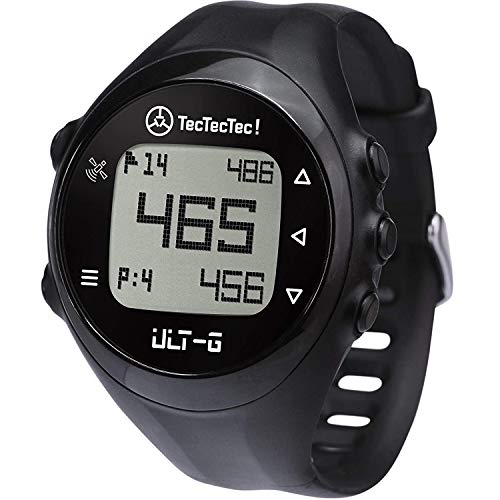
Pair your app with a golf GPS watch or smartwatch to see distances on your wrist, leave your phone in the cart, and maintain a distraction‑free round.
2026’s Best Golf Course Apps at a Glance
| App | Best For | Free / Paid | Platforms | Standout Feature |
|---|---|---|---|---|
| Golfshot | All‑around GPS & scoring | Free with Pro ($49.99/year) | iOS, Android, Apple Watch, Wear OS | 3D flyovers with real‑time distances |
| 18Birdies | Social play & game improvement | Free with Premium ($99.99/year) | iOS, Android, Apple Watch | Side games, friend challenges, strokes gained analytics |
| TheGrint | Handicap tracking & stats | Free with Pro ($39.99/year) | iOS, Android, Apple Watch | Official USGA handicap integration |
| Hole19 | Clean GPS & simple scoring | Free with Premium ($49.99/year) | iOS, Android, Apple Watch, Wear OS | Ultra‑fast GPS lock, minimal battery drain |
| SwingU | Instruction & GPS combo | Free with Plus ($99.99/year) | iOS, Android, Apple Watch | Built‑in swing tips & video lessons |
| Arccos Caddie | Automatic shot tracking | Free (requires Arccos sensors, $179.99+) | iOS, Android, Apple Watch | True AI‑powered caddie advice |
Prices are approximate and reflect annual subscriptions at the time of writing. Many apps offer a free tier with basic GPS and scoring – perfect for trying before you buy.
How to Pick the Right App for Your Game
- Beginners and casual players – Choose a free app with a simple interface and a big GPS number. Score tracking and basic stats are a bonus. Hole19 or the free tier of 18Birdies are excellent starting points.
- Handicap‑conscious golfers – Pick an app that offers official handicap calculation and detailed strokes‑gained analytics. TheGrint is purpose‑built for this and connects directly to the USGA.
- Data nerds & serious improvers – If you want to know exactly how far you hit each club and receive AI‑generated club recommendations, Arccos Caddie (with sensors) is the gold standard. Pair it with a GPS watch for a seamless round.
- Social butterflies – Apps like 18Birdies let you challenge friends, share round updates, and play side games like Skins or Nassau – all while keeping your GPS running. It’s a modern twist on classic golf traditions.
- Multi‑device users – If you already own a smartwatch or a GPS watch, ensure the app you pick has a robust wrist companion. Golfshot and Hole19 offer some of the best watch experiences.
Apps vs. Dedicated GPS Devices: Which Should You Use?
A smartphone app can match – and sometimes exceed – the accuracy of a standalone handheld GPS or even a basic laser rangefinder. The main advantage is cost: you probably already own the hardware, so a free or $50/year app replaces a $200–$400 device. Modern phones also provide rich, interactive hole maps that no monochrome handheld can replicate.
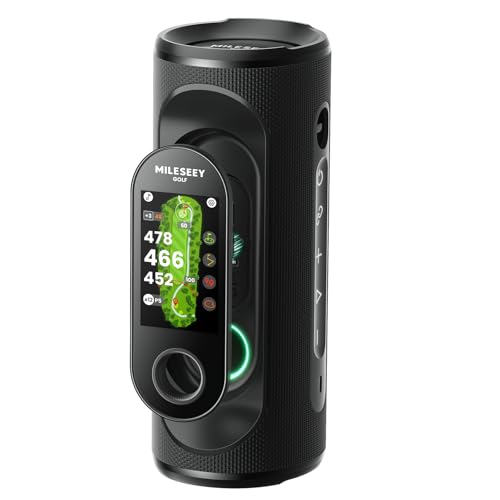
On the other hand, dedicated devices like a GPS rangefinder or a hybrid rangefinder are built for one purpose and often have superior battery life and weather resistance. For tournament play where phone usage may be restricted, a pure GPS watch or laser rangefinder remains the safer choice. Many competitive golfers use both – an app for casual rounds and practice, and a laser rangefinder for precise tournament yardages. Our rangefinder comparison guide can help you decide if a dedicated device still makes sense.
Tips to Get the Most from Your Golf Course App
- Pre‑load courses before you leave home – Most apps let you download course maps over Wi‑Fi so you don’t eat through mobile data on the course. This also guarantees fast GPS lock even in areas with weak signal.
- Use a power bank or phone case with extra battery – GPS and screen usage drain battery quickly. A small 5,000 mAh power bank in your golf bag ensures you won’t lose data on the back nine. (Many golf bags now have USB‑charging pockets built in.)
- Adjust for slope only when allowed – Apps that calculate “plays like” distances using elevation are incredibly helpful, but be aware that tournament rules often prohibit slope‑adjusted yardages. Most apps have a quick toggle to turn it off.
- Sync stats after every round – The real value of an app comes from long‑term trends. Make it a habit to review your round statistics to guide your next practice session, whether it’s putting, chipping, or driving accuracy.
- Combine with complementary training tools – Pair your course app with a swing analysis app or a coaching app to connect on‑course data with swing mechanics. That holistic approach is the fastest route to lower scores.