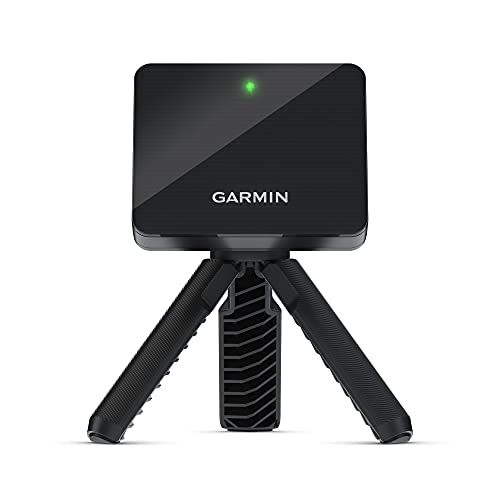
Golf Launch Monitor & Simulator Guide: Play Indoors Like a Pro
Unlock the power of data-driven practice. Learn how launch monitors and simulators can transform your game, whether you are building a home setup or seeking professional-grade feedback.
For decades, golf practice was limited to the driving range or a putting green. Today, technology has changed everything. A golf launch monitor can measure your swing and ball flight with incredible precision, while a golf simulator lets you play famous courses from the comfort of your home. Whether you are a low-handicap player chasing consistency or a beginner learning the fundamentals, these tools provide instant, objective feedback that accelerates improvement. In this comprehensive guide, we break down what these devices do, how they differ, and what to consider before making a purchase.
Launch Monitors vs. Simulators: What's the Difference?
The terms are often used interchangeably, but they describe different things. A launch monitor is a device that measures what happens at impact—clubhead speed, ball speed, launch angle, spin rate, and carry distance. A golf simulator takes that data and combines it with software and a projection screen to create an immersive virtual round. Think of the launch monitor as the sensor and the simulator as the entertainment system.
Data & Feedback
Launch monitors provide objective numbers on every shot, helping you identify weaknesses and track progress over time. Look for models that report spin rate and club path for the most complete picture.
Virtual Play
With a launch monitor with courses, you can play virtual replicas of world-famous layouts, making practice sessions more engaging and fun.
Space & Setup
Home simulators require a dedicated space. Pay attention to simulator distance from screen to ensure safety and accurate tracking.
Game Improvement
Combine launch monitor data with tools like swing plane trainers for a complete practice ecosystem.
Did You Know?
Many professional golfers use launch monitors during practice rounds to calibrate their club distances. You can achieve similar precision at home with a mid-range or premium model, making every practice session more productive than hitting balls without feedback.
Comparing Launch Monitor Tiers
Launch monitors span a wide range of capabilities. To help you choose, here is a comparison based on quality tiers rather than prices. Each tier serves a different type of golfer and practice environment.
| Feature | Entry-Level | Mid-Range | Premium |
|---|---|---|---|
| Primary Metrics | Ball speed, distance, launch angle | Adds spin rate, club path, face angle | Full suite including spin axis, smash factor |
| Best For | Casual practice, beginners | Serious amateurs, home simulators | Professionals, club fitters, coaches |
| Simulator Integration | Limited or none | Yes, with compatible software | Advanced, multi-camera systems |
| Space Requirements | Minimal (net and mat) | Moderate (screen and enclosure) | Dedicated room with precise setup |
| Tier Descriptor | Affordable | Mid-Priced | Top-Tier |
Setting Up Your Home Simulator
Building a home golf simulator is easier than ever, but a few key decisions will determine your experience. From choosing the right enclosure to ensuring your space is safe, follow these steps for a setup that delivers accurate data and hours of entertainment. If you are still exploring options, browsing golf simulators will give you an overview of systems available.
- Measure your space. You need enough room for your swing and a safe distance between the ball and the screen. Most setups require at least 10 feet of width and length, plus 8.5–9 feet of ceiling height.
- Choose your launch monitor. Decide whether you need a standalone device or one that integrates with simulator software. A launch monitor and simulator combo offers the best of both worlds.
- Select an impact screen and net. A quality impact screen is essential for projection and safety. For a more budget-conscious setup, consider a practice net cage with simulator impact screen.
- Install a hitting mat. Protect your floor and your joints with a durable mat that provides a realistic feel. Pair it with a practice net with hitting mat for a complete practice station.
- Set up software and projector. Connect your launch monitor to a computer or tablet, run the simulator software, and project the image onto your screen. Ensure the distance from screen is correct for accurate tracking.
- Test and calibrate. Hit a few shots to verify accuracy. Adjust lighting and positioning as needed. For indoor swing training, a training mat for swing detection can help refine your technique.
Pro Tip: Optimize Your Environment
Lighting can affect launch monitor accuracy. Use consistent, indirect lighting and avoid direct sunlight on the sensor. For radar-based units, ensure there are no reflective surfaces that could cause interference.
What to Look For When Buying
Before you commit to a purchase, consider how you will use the device. Are you looking for a simple training aid to use at the range, or a full simulator for year-round practice and entertainment? Here are the most important factors to weigh.
Accuracy & Data Points
Look for a model that reports the metrics you care about. If you want to work on your swing path, choose a monitor that measures club data. For ball flight improvement, focus on spin rate and launch angle.
Simulator Compatibility
If you plan to play virtual courses, verify that the launch monitor integrates with popular simulator software. Not all monitors support this feature.
Portability vs. Fixed Setup
Some monitors are designed for indoor use only, while others are portable enough for outdoor practice. Decide whether you need one device for both environments.
Software & Subscription
Consider ongoing costs for simulator software and course libraries. Some systems include a basic package, while premium options offer expansive course catalogs.
If you are looking for a simulator near you to try before you buy, search for a golf simulator near me for sale or visit a local indoor golf center. Exploring golf technology more broadly can also help you understand how launch monitors fit into the wider ecosystem of game-improvement tools. And if you prefer to practice outdoors, a indoor driving range near me can provide a climate-controlled environment with launch monitor data.
Frequently Asked Questions
What is the difference between a golf launch monitor and a golf simulator?
A launch monitor measures ball flight data like speed, launch angle, and spin. A golf simulator combines a launch monitor with software and a screen to create a virtual golf experience, allowing you to play famous courses indoors.
How much space do I need for a home golf simulator?
You typically need a room with at least 10 feet of width, 10 feet of length, and 8.5 to 9 feet of ceiling height. The exact space depends on the simulator system and your swing.
Are golf launch monitors accurate enough for serious practice?
Yes. High-end launch monitors used by professionals are extremely accurate, providing data on club path, face angle, and ball spin that is comparable to outdoor ball flight. Mid-range models are also highly reliable for game improvement.
Can I use a launch monitor outdoors?
Many launch monitors are designed for both indoor and outdoor use. Radar-based models often work well outdoors, while camera-based systems may require specific lighting conditions. Check the manufacturer's specifications for outdoor performance.
Do I need a subscription to use a golf simulator?
Some simulator software requires a subscription to access course libraries and online features. Others offer a one-time purchase with a set number of courses. Review the software options carefully before buying a simulator system.
Final Thoughts
Whether you choose a simple launch monitor for range sessions or a full home simulator, the right technology can make practice more effective and enjoyable. Use the data to identify areas for improvement, combine it with structured swing plane training, and watch your scores drop. For golfers who love gadgets, a golf GPS watch can complement your simulator setup by providing on-course distances. And if you are setting up a complete home practice area, consider adding a putting green mat for short-game work. The future of golf improvement is at your fingertips.