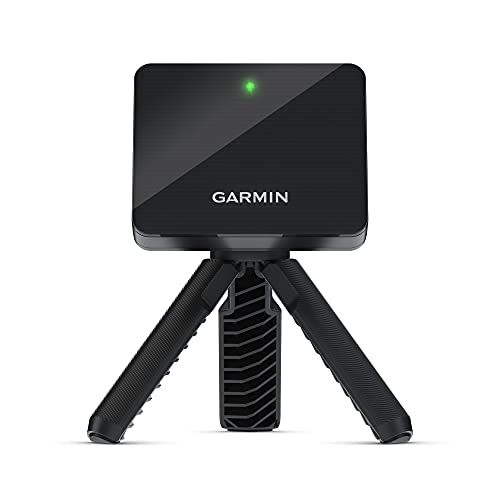
Golf Launch Monitors: The Complete Buying Guide
Understand ball flight data, compare monitor tiers, and choose the right launch monitor for your practice setup, club fitting, or home simulator — without guesswork.
Start the GuideWhat You'll Learn
What a Launch Monitor Really Does
A golf launch monitor is a measurement device that captures the initial conditions of a golf shot — how the club moves through impact and how the ball leaves the face. Rather than relying on feel alone, a monitor gives you objective feedback you can act on during practice, fitting, or simulation.
Launch monitors work in two main ways: radar-based systems track the club and ball in flight, while camera-based systems photograph the club and ball at impact. Many modern devices combine both technologies for higher accuracy. The data they produce helps you understand why a shot curves, why distance varies, and how changes to your swing translate into different ball flights. This makes a monitor a natural companion to structured swing fundamentals work and consistent training aids practice.
Key Data Points That Actually Matter
Not every metric is equally useful for every golfer. Here's a breakdown of the measurements you'll encounter and how to use them.
Ball Speed
The speed of the ball immediately after impact. It's the single biggest driver of distance and a direct indicator of how efficiently you transfer energy into the shot.
Clubhead Speed
How fast the club moves through impact. Comparing it with ball speed tells you your smash factor — an efficiency measure that reveals centered contact.
Launch Angle
The vertical angle at which the ball leaves the face. Too low or too high a launch can rob you of carry distance, especially with the driver.
Spin Rate
How quickly the ball rotates. Spin influences lift, curve, and how the ball behaves on landing. It's central to matching a ball to your swing.
Smash Factor
Ball speed divided by clubhead speed. A higher smash factor indicates more efficient energy transfer and typically more centered strikes.
Carry & Total Distance
Carry is where the ball lands; total includes roll. Both help you gap your clubs and choose the right club on course.
Club Path & Face Angle
The direction the club travels and where the face points at impact. Together they explain most shot curvature and directional misses.
Attack Angle
Whether you strike down or up on the ball. It shapes launch and spin and is especially relevant for driver optimization.
Monitor Tiers Explained
Launch monitors fall into recognizable market tiers. Using a consistent classification helps you compare devices fairly without getting lost in specs. Below is a practical framework.
| Tier | Best For | Typical Characteristics |
|---|---|---|
| Entry-level | Beginners, casual practice, basic feedback | Core metrics like ball speed and distance; simpler sensors; ideal for home nets and range sessions. |
| Mid-range | Improving players, structured practice, indoor nets | Adds spin, launch, and path data; improved accuracy; often includes app integration and session tracking. |
| Premium | Serious amateurs, club fitters, coaching setups | Dual radar-camera tech, high accuracy, detailed club data, robust software and simulation options. |
| Professional-grade | Teaching pros, fitting studios, commercial simulators | Tour-level accuracy, multi-camera arrays, comprehensive data, integration with fitting and simulation platforms. |
Within any tier, look for consistency over headline numbers. A mid-range monitor that repeats the same measurement reliably is more useful than a device with a long feature list but inconsistent readings. If you're building a practice space, pairing a monitor with a quality net or mat matters as much as the device itself — see our guide to the best launch monitors for hitting into a net.
Radar vs. Camera Systems
Understanding the underlying technology helps you match a device to your environment.
Radar-Based Monitors
Radar units track the club and ball through space. They tend to excel outdoors where there is room for the radar to follow flight, and they generally provide strong club data. Indoors, radar systems need sufficient distance between the ball and the net to capture readings accurately.
Camera-Based Monitors
Camera systems capture high-speed images at impact. They are often more compact and work well in tighter indoor spaces, making them popular for home setups. The trade-off is that some camera systems provide less club-path detail unless multiple cameras are used.
Hybrid Systems
Premium and professional-grade devices frequently combine radar and camera technologies to balance accurate ball flight with detailed club delivery data. These are the most versatile but sit in the higher tiers.
Indoor vs. Outdoor Setup Considerations
Your space dictates which monitor makes sense. Before comparing models, measure your room and think through the following.
- Distance to net: Radar units typically need more room between the ball and the net than camera units. Check the manufacturer's minimum distance requirement.
- Ceiling height: A full swing with a driver requires adequate clearance. Hitting irons only may allow a lower ceiling.
- Lighting: Camera-based systems are sensitive to lighting conditions. Consistent, even lighting improves reading reliability indoors.
- Flooring and mat: A stable, level mat improves repeatability. Pair your monitor with a quality hitting mat and net for a complete home practice station.
- Outdoor range use: If you plan to use the monitor at a driving range, favor portability and battery life. Radar units often shine in this environment.
If your primary goal is home practice, a dedicated setup guide and the right practice nets can save you from costly trial and error. For players working on tempo and consistency, combining a monitor with swing tempo trainers creates a feedback loop that accelerates improvement.
Software, Apps, and Simulation
The device is only half the story. The software ecosystem determines how useful the data becomes over time.
- Session tracking: Look for apps that log sessions so you can compare progress week over week.
- Skill games and challenges: Gamified practice keeps sessions focused and prevents mindless hitting.
- Simulation: Premium tiers often integrate with course simulation software, turning a home bay into a virtual range or course experience.
- Data export: Being able to export data helps coaches and fitters analyze trends rather than single shots.
A monitor with modest hardware but excellent software often delivers more long-term improvement than a feature-heavy device with a clunky app. Consider how you'll review data and whether the app ecosystem matches your routine.
Step-by-Step Buying Framework
Use this sequence to narrow your options efficiently.
- Define your primary use case. Home net practice, driving range feedback, club fitting, or full simulation each demand different strengths.
- Measure your space. Confirm minimum distance to net and ceiling height before shortlisting devices.
- Choose your technology. Camera for tighter indoor spaces, radar for outdoor range work, hybrid for maximum versatility.
- Pick your tier. Entry-level for basics, mid-range for structured improvement, premium or professional-grade for fitting and simulation.
- Check the software. Review app quality, session tracking, and simulation support.
- Confirm the data set. Ensure the metrics you care about — ball speed, spin, path, face angle — are included.
- Plan the complete setup. Budget attention for a mat, net, and lighting if practicing indoors.
Once you've chosen a monitor, integrate it into a broader improvement plan. Pair data-driven practice with swing analysis and beginner-friendly fundamentals to turn numbers into real on-course gains. Players refining their setup often find that launch monitors and training aids complement each other well.
Frequently Asked Questions
Do I need a launch monitor to improve?
No, but it accelerates feedback. A monitor replaces guesswork with objective data, which is especially helpful when practicing indoors or working on specific swing changes.
Can an entry-level monitor be accurate enough?
Entry-level devices are generally reliable for core metrics like ball speed and distance. Accuracy improves as you move up tiers, particularly for spin and club-path data.
How much space do I need indoors?
It depends on the technology. Camera-based units typically need less distance to the net than radar units. Always check the manufacturer's minimum distance and ceiling-height guidance before purchasing.
Do launch monitors work with any net?
Most work with standard practice nets, but the ball-to-net distance matters for radar accuracy. A quality net and mat improve both safety and reading consistency.
Can I use a launch monitor for club fitting?
Yes. Mid-range and above devices provide the data fitters use — ball speed, launch, spin, and path — though professional fitting studios typically use premium or professional-grade systems for the most detailed club data.
Ready to Choose Your Launch Monitor?
Explore our recommended options below, compare tiers, and match a device to your practice space and goals.
View Recommended Monitors